I had a call this week with a business owner who was absolutely beaming.
“We finally did it,” he told me. “We followed all the recommendations in the dashboard. Our Optimisation Score is a perfect 100%!”
I immediately became suspicious. I asked him to open his conversion data.
As I suspected: Spend was up 40%. Cost-per-lead had doubled. Lead quality had plummeted.
He had achieved a perfect score, but he had broken his business model in the process.
Here is the Hard Truth I share with my clients: Google’s Optimisation Score is not a measure of campaign success. It is just a measure of your adoption of Google’s features.
If you are running Lead Gen campaigns, chasing that blue 100% bar is a dangerous game. Here is how to play it properly.
The Gamification of Your Budget
Google is brilliant at user interface design. They have placed a large, blue percentage bar at the top of your dashboard.

When it sits at 70%, it feels like an unfinished task. It nags at you. It triggers the same part of your brain that wants to complete a level in a video game or get an A+ on a school exam.
But what goes into that score?
The Optimisation Score is calculated based on "Recommendations" that Google’s AI thinks will improve your performance.1These fall into buckets like:
- Bidding and Budgets
- Keywords and Targeting
- Ads and Assets (such as Sitelinks)
- Repairs (broken links, etc.)
It sounds helpful. And sometimes, it is. But you must remember that Google’s objective is not identical to your objective.
Your Goal is Profit.
Google’s Goal is Revenue (for Google) and Data. They earn more revenue when your campaign gets more clicks. They get more data when your campaign gets more impressions
The Conflict: Automation vs. Precision
For Lead Generation, precision is everything. We want to show up for the right person, not every person.
The Optimisation Score, however, is biassed towards expansion.
To get to 100%, Google will often recommend things like:
- “Switch to Broad Match keywords” (Often disastrous for niche B2B).
- “Increase your daily budget” (Easy to say when it’s not your money!).
- “Expand to the Display & Partner Network” (Great for impressions, often detrimental for lead quality).
If you blindly click "Apply All" to satisfy the score, you are handing the keys of your strategy over to an algorithm that might not understand your business model and your ideal customer profile.
The "Dismiss" Button Secret
Here is the secret that Google hides in plain sight: You don't have to apply the recommendation to get the points.
If you click the three little dots on a recommendation and select "Dismiss," your score goes up just as if you had applied it.
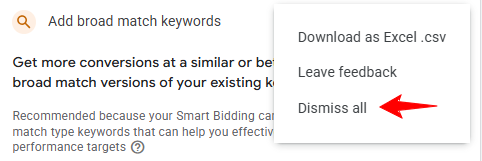
You can have a 100% Optimisation Score by saying "No" to everything. This proves that the Score is just a Checklist of decisions made, not necessarily actions taken.
What to Consider vs. What to Ignore
So, how should you treat the Recommendations tab? Treat it like a junior assistant: eager to help, sometimes insightful, but lacking real-world context.
 What to Consider (The Hygiene Checks):
- Conflicting Negative Keywords: If you blocked a keyword that is blocking your ads from running, fix it.
- Measurement Issues: If your conversion tracking is broken, listen to the warning immediately.
- Redundant Keywords: Cleaning up duplicates is just good housekeeping.
 What to Ignore (The "Growth" Traps):
- "Turn on Auto-Apply": Never, ever do this. Maintain control.
- "Upgrade to Broad Match": Only do this if you have massive conversion data and a loose budget. For tight Lead Gen, stick to Phrase/Exact match.
- "Raise Budget to Get X More Clicks": Ignore the projection. Only raise the budget if your current CPA justifies it.
The Takeaway: Optimise for Wallet, Not Ego
A 100% score looks pretty in a screenshot, but it doesn't pay your bills.
I would rather manage an account with a 65% Optimisation Score that generates high-quality leads at a €30 cost, than a 100% account generating junk at €100.
Don't let the blue bar control you. Review the recommendations, dismiss the ones that don't fit your strategy, and keep your eyes on the metrics that matter: Conversions, CPA and ROAS.
Is Your Account Bleeding Budget?
Are you worried that you (or a previous agency) might have "Auto-Applied" your way into a mess? Do you want a human expert to review your strategy, rather than a bot?
I am a 5-Star Vetted Seller on Fiverr. I specialise in untangling messy accounts and realigning Google Ads with business goals.
Book a 1-on-1 Session on my Fiverr Profile >>>
Let’s ignore the vanity metrics and focus on your bottom line