Keywords vs. Search Terms: In a world of blind automation, understanding the 'Platonic Ideal' of keywords vs. the 'Messy Reality' of user queries is the only way to avoid the hidden money pits of Google Ads.
Many professionals use the terms "keyword" and "search term" interchangeably, but the difference is critical to the financial health of your Google Ads account. A "Keyword" is the abstraction you bid on; the "Search Term" is the messy reality of what the user typed.
Understanding this distinction is the difference between a profitable campaign and a money pit. Here is why they are not synonyms, how they impact your costs, and how to master the Search Terms Report.
When I get hired for a campaign audit, I often find a Search Terms report that appears as if nobody has ever looked at it. It is a problem I regularly come across.
The Critical Distinction: Theory vs. Reality
To understand the difference, you must look at who is generating the data:
- Keywords are created by Marketers. They are the exact word or phrase you target in a campaign to define your strategy.
- Search Terms (or Search Queries) are generated by Users. This is the actual string of words a user types into the Google or Bing search box.
Think of a keyword as the "Platonic ideal" of a search query—an abstraction we extrapolate from user behaviour.
The search term on the other hand is the real-world application of that keyword, which often includes misspellings, additional words, or a completely different order of phrasing, sometimes even a completely different search intent.
Simply put: Keywords represent what you want to target. Search terms represent the reality of what you are actually paying for.
When Keywords and Search Terms don't align
If you do not monitor the relationship between your keywords and the actual search terms they trigger, you risk paying for traffic that has zero commercial intent.
An example I recently came across: A Notary Service in Kensington, London was targeting the keyword "Notary London". The ads were shown and clicked for the search term: Legal Aid London. £13 per click for a completely different search intent.
The same campaign also triggered ads for the search term "Citizen Advice Bureau Brixton", a local charity organisation (8.91 £/click). Without proper management, keywords can trigger ads for search terms of users in search of something related but with a completely different intent, in the cases above actually for a free service. This can have a devastating impact on your search ads budget.
How to Access the "Invoice" (Search Terms Report)
If your keyword list is your suggestion to Google, the Search Terms Report is the invoice. It tells you exactly what you paid for. You must review this report obsessively to align your spend with your goals.
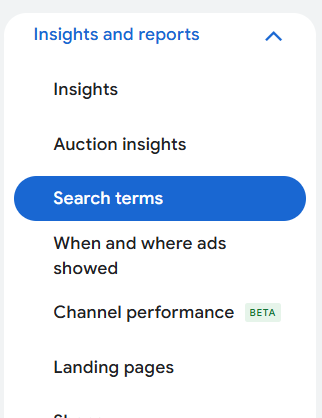
To access this data in Google Ads:
- Navigate to your account dashboard.
- Expand the "Insights and reports" tab on the left.
- Click "Search Terms"
This report shows a list of the actual queries that triggered your ads and resulted in clicks. It also displays the "Match Type" column, indicating how closely the user's query related to your keyword.
By clicking on “Columns” at the top of the table you can modify the columns. Add the column “Keyword”. This allows you to see which search term was triggered by which keyword. Check the column “Match Type”. You will realise that Broad Match Keywords often trigger irrelevant Search Terms, especially if your campaign doesn’t have enough valid conversion data.
The Economic Impact: Quality Score
The misalignment between keywords and search terms does not just waste budget on bad clicks; it actively damages your Quality Score (QS).
Quality Score is composed of three pillars: Ad Relevance, Expected Click-Through Rate (CTR), and Landing Page Experience. When your keyword triggers an irrelevant search term (e.g., a user searches "cheap watches" and sees your ad for "luxury watches"), the user is unlikely to click. This lowers your CTR, which lowers your Quality Score.
Furthermore, you need to consider that searchers might not really read your ad in depth. They might click your ad, you pay, and land on your landing page that might not be what they actually searched for. This will have a negative impact on Landing Page experience, another factor of the Quality Score.
The economic consequences are severe. Based on the "WordStream" Benchmark:
- A Quality Score of 10/10 results in a 50% discount on your Cost Per Click (CPC).
- A Quality Score of 1/10 results in a 400% penalty on your CPC.
By allowing your keywords to trigger irrelevant search terms, you are essentially paying a tax on every single click in your account.
A Quality Score of 1/10 isn't just a number; it's a 400% penalty tax on every click. When your keywords trigger irrelevant search terms, you aren't just losing a lead—you're actively funding Google's bottom line at the expense of your own." — Dirk Röttges
Strategies for Analysis and Action
You cannot force users to search exactly how you want, but you can control which search terms you pay for.
1. The Art of Negative Keywords This is your primary defence. If you sell high-end consulting, you must add "free," "jobs," "salary," or "template" as negative keywords. This prevents your ad from showing when those specific terms are present in the query. Regularly reviewing your Search Terms Report allows you to identify these irrelevant themes and exclude them, optimising your costs and improving your conversion rate

2. Harvesting High-Performing Terms The Search Terms Report isn't just for blocking bad traffic; it is for finding gold. You may discover that users are finding you via queries you hadn't thought of. If a specific search term is converting well, you should add it as a specific keyword. This allows you to bid more aggressively on that specific term and write ads tailored exactly to that query. Address this keyword in the ads on the Landing Page!
3. Refining Match Types If a keyword is pulling in too many irrelevant search terms, consider tightening the match type.
- Broad Match casts a wide net and captures synonyms and related intent, which is great for Smart Bidding but requires heavy negative keyword management, and valid longer-term conversion data.
- Exact Match provides the most control, ensuring your ad only shows for users searching with the same meaning or intent as your keyword.
Conclusion
In Google Ads, Keywords are what you buy, but Search Terms are what you pay for. Your keyword list is merely a set of instructions you give to the algorithm; the Search Terms Report is the reality of how those instructions were interpreted.
By auditing this report weekly and aggressively using negative keywords, you stop paying for "window shoppers" and start investing in future clients.
If you want me to have a look at your lead generation Search Campaign, review my 5-star vetted Business Profile on Fiverr and feel free to book a session with me!